

Appearance
Measurement Modes
The SDK supports the following measurements modes:
Once a face session is created, the application can receive notification on the session state transitions, the allowed vital signs for the session and set the user information.
Face Measurement
A face measurement is performed by creating a face session and facing the front (selfie) camera to the user's face.
Kotlin
try {
    val licenseDetails = LicenseDetails("<ENTER_YOUR_LICENSE_KEY>")
    val session = FaceSessionBuilder(applicationContext)
                    .withImageListener(this)
                    .withVitalSignsListener(this)
                    .withSessionInfoListener(this)
                    .build(licenseDetails)
} catch (e: HealthMonitorException) {
    Log.i("ERROR", "Received Error. Domain: ${e.domain} Code: ${e.errorCode}")
}
Java
try {
    LicenseDetails licenseDetails = new LicenseDetails("<ENTER_YOUR_LICENSE_KEY>");
    Session session = new FaceSessionBuilder(getApplicationContext())
                    .withImageListener(this)
                    .withVitalSignsListener(this)
                    .withSessionInfoListener(this)
                    .build(licenseDetails);
} catch (HealthMonitorException e) {
    Log.i("ERROR", "Received Error. Domain: "+ e.getDomain() +" Code: "+ e.getErrorCode());
}
After creating the face session the application can receive the camera images, create camera preview, set the [device orientation] and enforce the image validity according to the measurement guidance.
Face Measurement Using the Back Camera
The SDK supports taking face measurements using the back camera. It is recommended to use withStrictMeasurementGuidance(true) when using the back camera to ensure accurate face distance calculations and avoid invalid image issues.
Note
This option is for evaluation and integration purposes only. Please contact our support if you would like to use this option in production.
Kotlin
try {
    val licenseDetails = LicenseDetails("<ENTER_YOUR_LICENSE_KEY>")
    val session = FaceSessionBuilder(applicationContext)
                    .withCameraLocation(CameraLocation.BACK)
                    .withImageListener(this)
                    .withVitalSignsListener(this)
                    .withSessionInfoListener(this)
                    .build(licenseDetails)
} catch (e: HealthMonitorException) {
    Log.i("ERROR", "Received Error. Domain: ${e.domain} Code: ${e.errorCode}")
}
Java
try {
    LicenseDetails licenseDetails = new LicenseDetails("<ENTER_YOUR_LICENSE_KEY>");
    Session session = new FaceSessionBuilder(getApplicationContext())
                    .withCameraLocation(CameraLocation.BACK)
                    .withImageListener(this)
                    .withVitalSignsListener(this)
                    .withSessionInfoListener(this)
                    .build(licenseDetails);
} catch (HealthMonitorException e) {
    Log.i("ERROR", "Received Error. Domain: "+ e.getDomain() +" Code: "+ e.getErrorCode());
}
Polar Measurement
A Polar measurement is conducted by creating a polar session and pairing the device with the Polar Verity Sense sensor.
Kotlin
try {
    val licenseDetails = LicenseDetails("<ENTER_YOUR_LICENSE_KEY>")
    val deviceID = "<ENTER_POLAR_DEVICE_ID>"
    val session = PolarSessionBuilder(applicationContext, deviceID)
                    .withVitalSignsListener(this)
                    .withSessionInfoListener(this)
                    .withPPGDeviceInfoListener(this)
                    .build(licenseDetails);
} catch (e: HealthMonitorException) {
    Log.i("ERROR", "Received Error. Domain: ${e.domain} Code: ${e.errorCode}")
}
Java
try {
    LicenseDetails licenseDetails = new LicenseDetails("<ENTER_YOUR_LICENSE_KEY>");
    String deviceID = "<ENTER_POLAR_DEVICE_ID>";
    Session session = new PolarSessionBuilder(getApplicationContext(), deviceID)
                    .withVitalSignsListener(this)
                    .withSessionInfoListener(this)
                    .withPPGDeviceInfoListener(this)
                    .build(licenseDetails);
} catch (HealthMonitorException e) {
    Log.i("ERROR", "Received Error. Domain: "+ e.getDomain() +" Code: "+ e.getErrorCode());
}
The user must wear the Verity Sense device on the forearm and follow the best practices for taking a measurement using external devices.
The Polar Device ID can either be retrieved by the PPG Device Scanner or found on the Polar device as shown in the image below: 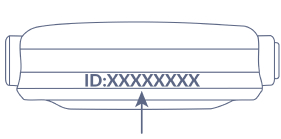
Additional information regarding Polar Verity Sense can be found in Polar Verity Sense User Manual.