

Appearance
Measurement Modes
The SDK supports the following measurements modes:
Once a face session is created, the application can receive notification on the session state transitions, the allowed vital signs for the session and set the user demographic info.
Face Measurement
A face measurement is performed by creating a face session and facing the front (selfie) camera to the user's face.
Kotlin
try {
    val licenseDetails = LicenseDetails("<ENTER_YOUR_LICENSE_KEY>")
    val session = FaceSessionBuilder(applicationContext)
                    .withImageListener(this)
                    .withVitalSignsListener(this)
                    .withSessionInfoListener(this)
                    .build(licenseDetails)
} catch (e: HealthMonitorException) {
    Log.i("ERROR", "Received Error. Domain: ${e.domain} Code: ${e.errorCode}")
}
Java
try {
    LicenseDetails licenseDetails = new LicenseDetails("<ENTER_YOUR_LICENSE_KEY>");
    Session session = new FaceSessionBuilder(getApplicationContext())
                    .withImageListener(this)
                    .withVitalSignsListener(this)
                    .withSessionInfoListener(this)
                    .build(licenseDetails);
} catch (HealthMonitorException e) {
    Log.i("ERROR", "Received Error. Domain: "+ e.getDomain() +" Code: "+ e.getErrorCode());
}
After creating the face session the application can receive the camera images, create camera preview, set the [device orientation] and enforce the image validity according to the measurement guidance.
Polar Measurement
A Polar measurement is conducted by creating a polar session and pairing the device with the Polar Verity Sense sensor.
Kotlin
try {
    val licenseDetails = LicenseDetails("<ENTER_YOUR_LICENSE_KEY>")
    val deviceID = "<ENTER_POLAR_DEVICE_ID>"
    val session = PolarSessionBuilder(applicationContext, deviceID)
                    .withVitalSignsListener(this)
                    .withSessionInfoListener(this)
                    .withPPGDeviceInfoListener(this)
                    .build(licenseDetails);
} catch (e: HealthMonitorException) {
    Log.i("ERROR", "Received Error. Domain: ${e.domain} Code: ${e.errorCode}")
}
Java
try {
    LicenseDetails licenseDetails = new LicenseDetails("<ENTER_YOUR_LICENSE_KEY>");
    String deviceID = "<ENTER_POLAR_DEVICE_ID>";
    Session session = new PolarSessionBuilder(getApplicationContext(), deviceID)
                    .withVitalSignsListener(this)
                    .withSessionInfoListener(this)
                    .withPPGDeviceInfoListener(this)
                    .build(licenseDetails);
} catch (HealthMonitorException e) {
    Log.i("ERROR", "Received Error. Domain: "+ e.getDomain() +" Code: "+ e.getErrorCode());
}
The user must wear the Verity Sense device on the forearm and follow the best practices for taking a measurement using external devices.
The Polar Device ID can either be retrieved by the PPG Device Scanner or found on the Polar device as shown in the image below: 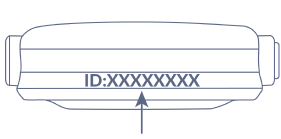
Additional information regarding Polar Verity Sense can be found in Polar Verity Sense User Manual.