

Appearance
Measurement Modes
The SDK supports the following measurements modes:
Once a face session is created, the application can receive notification on the session state transitions, the allowed vital signs for the session and set the user demographic info.
Face Measurement
A face measurement is performed by creating a face session and facing the front (selfie) camera to the user's face.
TypeScript
import {
    SessionBuilder
} from 'biosensesignal-react-native-sdk';

try {
    const session = await SessionBuilder.faceSession({licenseKey: "<ENTER_YOUR_LICENSE_KEY>"});
} catch (e) {
    const exception = (e as HealthMonitorException)
    console.log(`Error: ${exception?.code}`);
}
After creating the face session the application can receive the camera images, create camera preview, set the [device orientation] and enforce the image validity according to the measurement guidance.
Polar Measurement
A Polar measurement is conducted by creating a polar session and pairing the device with the Polar Verity Sense sensor.
TypeScript
import {
    SessionBuilder
} from 'biosensesignal-react-native-sdk';

try {
    const session = await SessionBuilder.polarSession(
        {licenseKey: "<ENTER_YOUR_LICENSE_KEY>"},
        {deviceId: "<ENTER_POLAR_DEVICE_ID>"});
} catch (e) {
    const exception = (e as HealthMonitorException)
    console.log(`Error: ${exception?.code}`);
}
The user must wear the Verity Sense device on the forearm and follow the best practices for taking a measurement using external devices.
The Polar Device ID can either be retrieved by the PPG Device Scanner or found on the Polar device as shown in the image below: 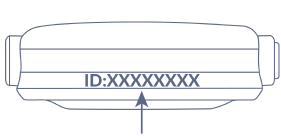
Additional information regarding Polar Verity Sense can be found in Polar Verity Sense User Manual.