

Appearance
Session State
A measuring session is always in a "state". The session transitions between possible states either by following an API action called by the application, or via internal logic that is intended to prepare the session for performing measurements. The session state diagram appears in the figure below.
Session States
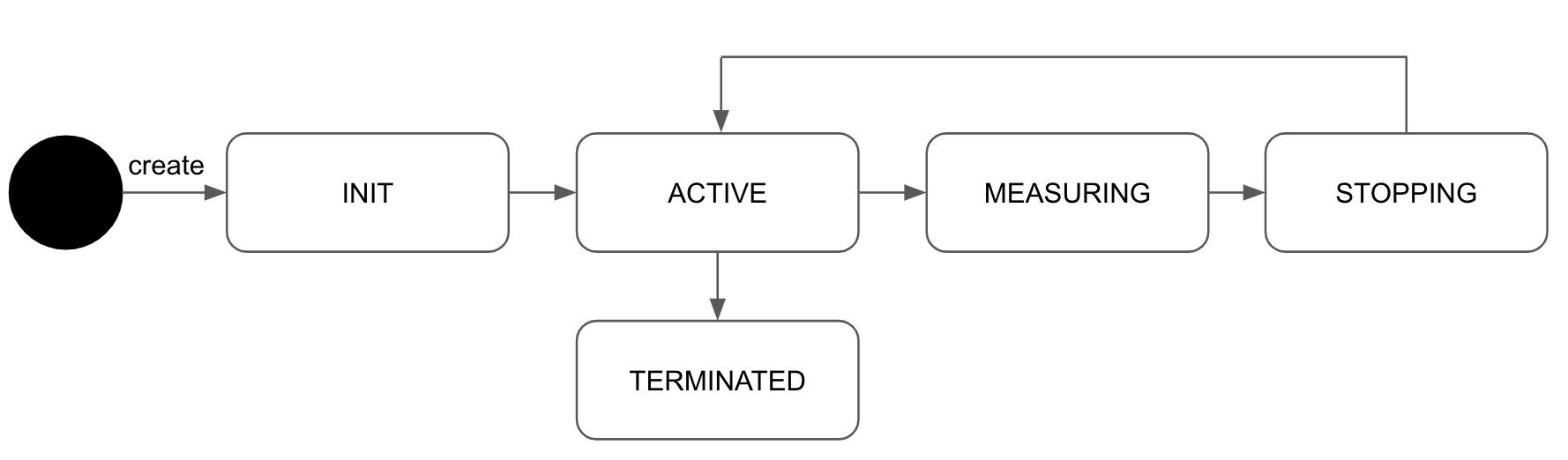
The table below provides a description of each session state:
| State Name | State Definition |
|---|---|
| INIT | The session is in its initial state, performing initialization actions. Please wait until you receive the message indicating that the session is in the ACTIVE state before starting to measure vital signs or before calling any session APIs. |
| ACTIVE | The session is now ready to be started. The application can display the camera preview, if using face measurements. Refer to the Creating a Preview page for detailed instructions. |
| MEASURING | The session is processing the data and calculating vital signs. For information on the handling of instantaneous vital signs, please refer to the Vital Signs page. |
| STOPPING | The session has been stopped, and the measurement results are being calculated. For information on the handling the final results, please see the Vital Signs page. |
| TERMINATED | The session has been gracefully terminated, and a new session can now be initiated. |
Session State Transitions
The table below describes the actions that cause a transition between the states:
| State | Next State | Trigger |
|---|---|---|
| INIT | ACTIVE | Once all initialization actions are completed, the session transitions to the ACTIVE state. |
| ACTIVE | MEASURING | Calling the start() method causes the session to transition to the MEASURING state. |
| MEASURING | STOPPING | The session will transition to the STOPPING state under the following circumstances: *The measurement ends gracefully either because it reached the defined duration or due to a manual invocation of the stop() method. *The measurement was stopped due to an error. Refer to the Alerts section for more information. |
| STOPPING | ACTIVE | The SDK has finished performing the vital sign calculations. |
| READY | TERMINATED | By calling the terminate() method, the session transitions to the TERMINATED state. |
Note
The STOPPING state is a 'transition state' that end automatically after a short period. Do not call any session methods while the session is in transition.
Receiving Session State Updates
The application can receive session state updates by using OnStateChange callback:
TypeScript
import {
    SessionState,
} from '@biosensesignal/web-sdk';

const onStateChange = useCallback((state: SessionState) => {
    // Receive session state updates
}, []);
Handling State Transitions
The code below is a simple example for handling session transitions updates by using OnStateChange callback:
TypeScript
import {
    SessionState,
} from '@biosensesignal/web-sdk';

const onStateChange = useCallback((state: SessionState) => {
    switch (state) {
        case SessionState.INIT:
            console.log("Session is initializing and NOT ready");
            break;
        case SessionState.ACTIVE:
            console.log("Session is ready to start measuring");
            break;
        case SessionState.MEASURING:
            console.log("Session is measuring vital signs");
            break;
        case SessionState.STOPPING:
            console.log("Session is stopping the measuring of vital signs");
            break;
        case SessionState.TERMINATED:
            console.log("Session is terminated");
            break;
    }
}, []);