

Appearance
Add COOP and COEP Headers to Allow Use of SharedArrayBuffer
Intro
Our multi-threaded WASM relies on SharedArrayBuffer which is gated behind COOP and COEP headers.
Goal
Add COOP and COEP headers to allow use of SharedArrayBuffer.
Note
SharedArrayBuffer in Safari/iOS is only supported from version 15.2 so make sure your browser is up to date.
Solution
Our Web SDK uses SharedArrayBuffer which requires cross-origin isolation. Follow these instructions to enable cross-origin isolation:
Set the
Cross-Origin-Opener-Policy: same-originheader on your top-level document. If you had setCross-Origin-Opener-Policy-Report-Only: same-origin, replace it. This blocks communication between your top-level document and its popup windows.Set the
Cross-Origin-Embedder-Policy: require-corpheader on your top-level document. If you had setCross-Origin-Embedder-Policy-Report-Only: require-corp, replace it. This will block the loading of cross-origin resources that are not opted-in.Check that
self.crossOriginIsolatedreturnstruein console to verify that your page is cross-origin isolated.
Notes for Issues with iframe or Integrations with Third Party Packages
- Enabling cross-origin isolation on a local server might be challenging as simple servers do not support sending headers. You can launch Chrome with a command-line flag
--enable-features=SharedArrayBufferto enable SharedArrayBuffer without enabling cross-origin isolation. Learn how to run Chrome with a command line flag on respective platforms. - For a production server you could register for an origin trial here: Delaying the Desktop Chrome change
If you are using cross-origin resources, cross-origin isolation requires explicitly opting in all cross-origin resources. Follow these steps to opt them in:
On cross-origin resources such as images, scripts, stylesheets, iframes, and others:
- Set the
Cross-Origin-Resource-Policy: cross-originheader - For same-site resources, set
Cross-Origin-Resource-Policy: same-siteheader
- Set the
For resources loadable using CORS:
- Set the
crossoriginattribute in HTML tags (e.g.,<img src="example.jpg" crossorigin>) - For JavaScript fetch requests, set
request.modetocors
- Set the
For iframes using SharedArrayBuffer:
- Add
allow="cross-origin-isolated"to the<iframe>tag - For nested iframes or worker scripts, apply these steps recursively
- Set
Cross-Origin-Embedder-Policy: require-corpheader on all iframes and worker scripts
- Add
Handle popup windows:
- Note that cross-origin popup windows using
postMessage()won't work with cross-origin isolation - Alternative solutions:
- Move communication to a non-cross-origin isolated document
- Use HTTP requests instead
- Note that cross-origin popup windows using
Impact Analysis (Optional)
You can also analyze the impact of cross-origin isolation on your cross-origin resources before enabling by following the instruction given below. Please keep in mind that this is not a mandatory step but it can help you assess which resources will or might be affected by cross origin-isolation.
- Set
Cross-Origin-Opener-Policy-Report-Only: same-originon your top-level document1. As the name indicates, this header only sends reports about the impact that COOP: same-origin would have on your site—it won't actually disable communication with popup windows - Set up reporting and configure a web server to receive reports
- Set
Cross-Origin-Embedder-Policy-Report-Only: require-corpon your top-level document. Again, this header lets you see the impact of enabling COEP: require-corp without actually affecting your site's functioning yet. You can configure this header to send reports to the same reporting server that you set up in the previous step.
How to Add COOP and COEP Headers for IIS
IIS Setup
There are three ways to add COOP and COEP headers in IIS:
1. Using IIS Manager
Follow these instructions and add:
Name: Cross-Origin-Opener-Policy
Value: same-origin
Name: Cross-Origin-Embedder-Policy
Value: require-corp2. In IIS config - add lines 5 and 6 below in your IIS Config.
<configuration>
 <system.webServer>
  <httpProtocol>
   <customHeaders>
    <add name="Cross-Origin-Opener-Policy" value="same-origin" />
    <add name="Cross-Origin-Embedder-Policy" value="require-corp" />
   </customHeaders>
  </httpProtocol>
 </system.webServer>
</configuration>
3. Programmatically - see this link for your preferred language
How to Add COOP and COEP Headers for CloudFront
- Enter AWS CloudFront > Function and add modify-headers handler like so:
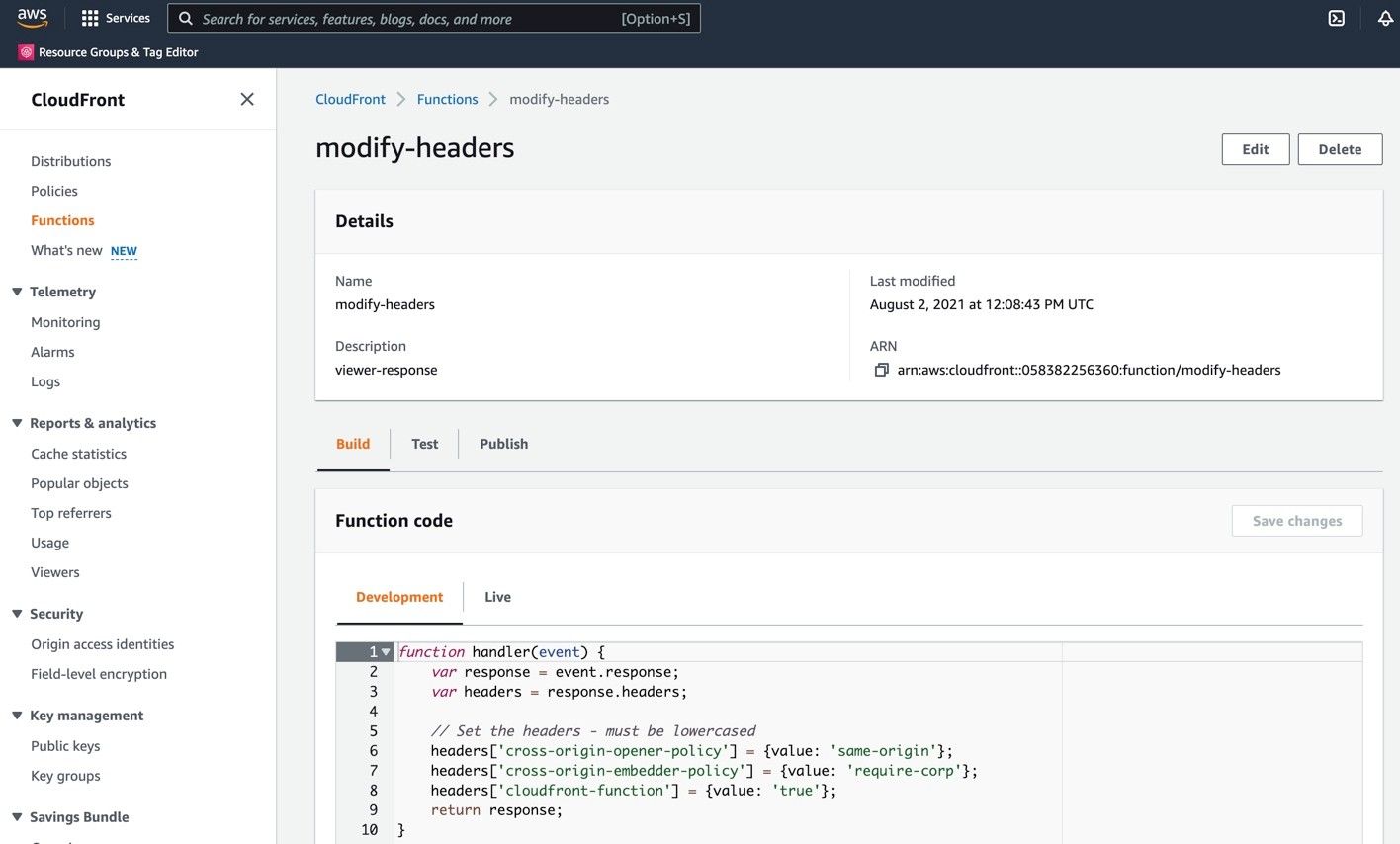
CloudFront Function Code:
javascript
function handler(event) {
   var response = event.response;
   var headers = response.headers;

   /* Set the headers - must be lowercased */
   headers['cross-origin-opener-policy'] = {value: 'same-origin'};
   headers['cross-origin-embedder-policy'] = {value: 'require-corp'};
   headers['cloudfront-function'] = {value: 'true'};
   return response;
}
To associate the modify-headers to a specific distributions you have the following two options:
Option 1:
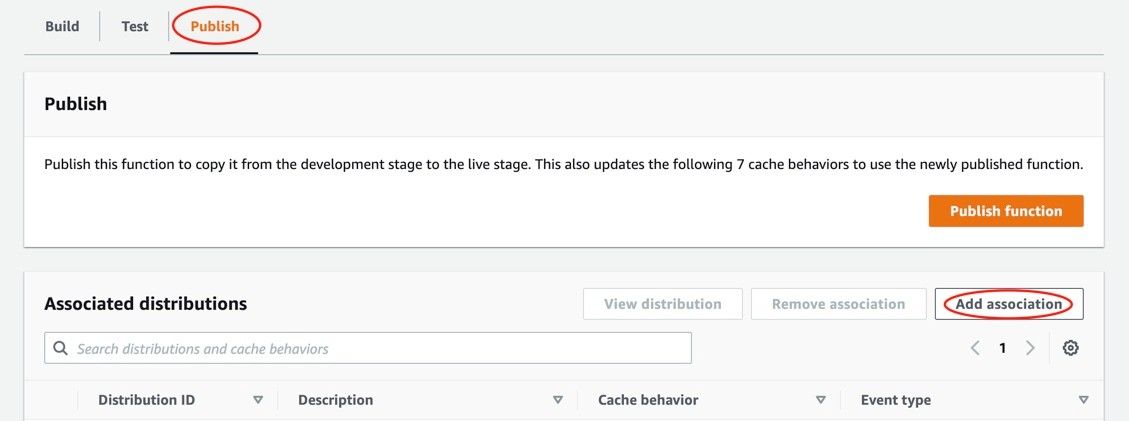
In Publish tab above click on "Add association" to add the distribution like so:
Option 2:
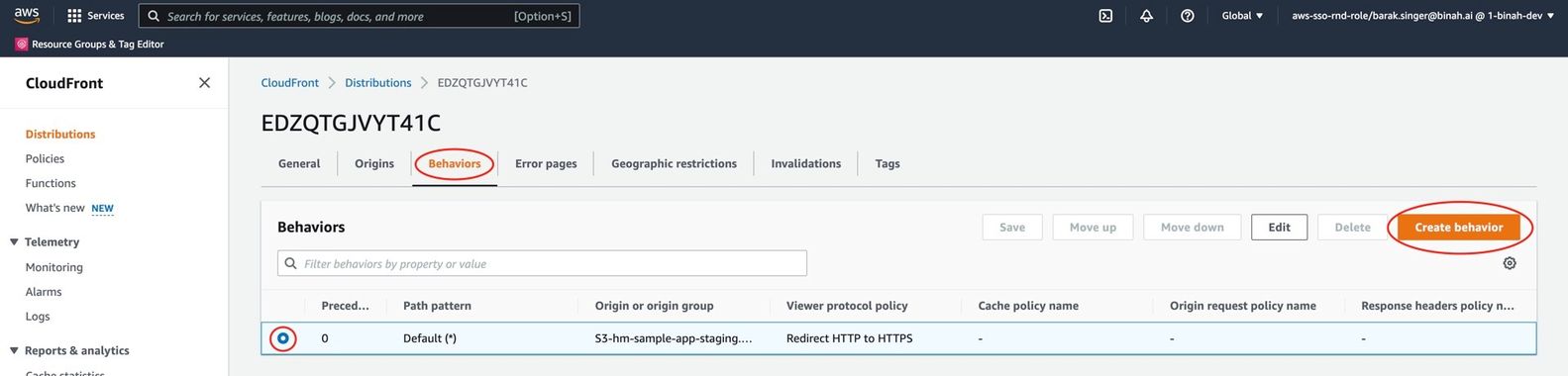
- Enter CloudFront > Distributions > Behaviors and click on "Create behavior."
- Scroll down to "Function Association" and select modify-headers under "Viewer response".
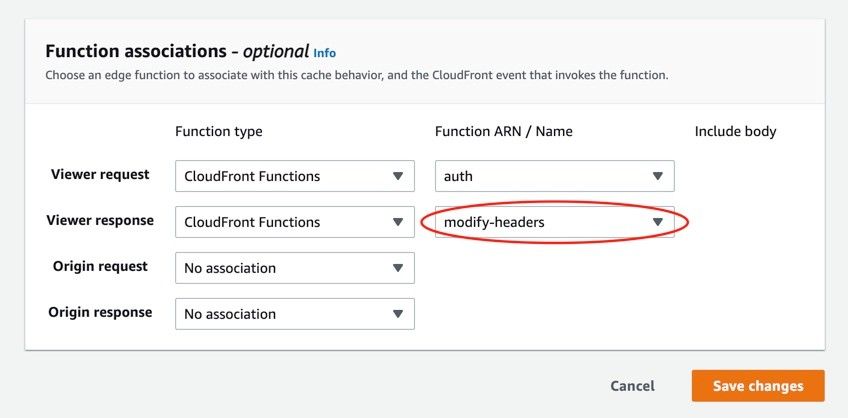
- Finally, click on "Save changes"